
NSA,DoD Certified Degaussers.
Securely and permanently erases magnetic data from hard drives and tape media
The Proton PDS-SSD Solid State Destroyer is a device designed to help you erase personal data. There are many reasons why someone might want to destroy a hard disk. Typically, it is because the device contains important personal data but can no longer be accessed due to damage.
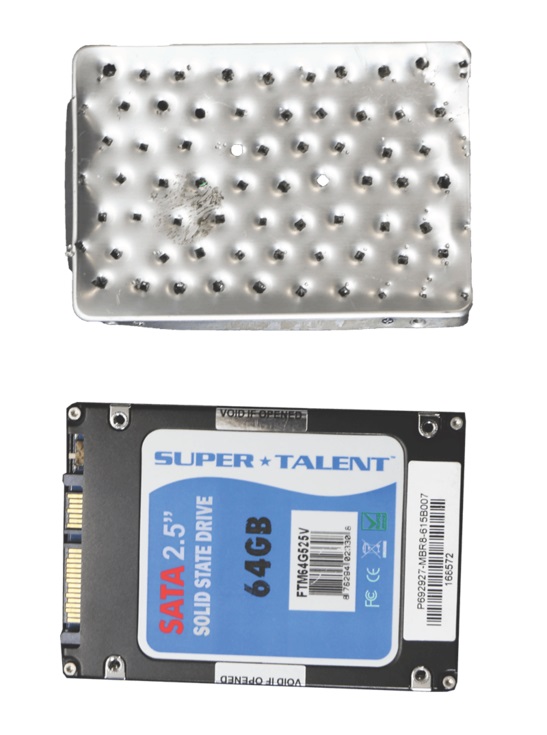
To prevent unwanted incidents, the most effective way is to destroy the device. No one can predict when a hacker might steal the data and cause harm to you. If the device is not destroyed, you would still have to keep it, even if it’s no longer in use. Do not simply throw away the hardware.
If the hardware is still accessible, you can simply delete all the data on it. However, if it is no longer accessible, you have two options: keep it or destroy it. Keeping useless hardware only wastes time and space.
Therefore, the most effective solution is to destroy it. Destruction can be done manually or with a specialized device. This device is called the Proton PDS-SSD Solid State Destroyer, a well-known tool designed to help minimize risks by ensuring that hardware cannot be stolen or misused by unauthorized individuals.
| Destruction Chamber | : | 6”D x 0.5”H x 3”W (15.24cm x 1.27cm x 7.6cm) |
| Media | : | Standard SSDs, mobile phones, SIM cards, flash drives, USB thumb drives, SSHD controller boards, etc. |
| Destruction System | : | Electro-galvanized steel pins |
| Process Time | : | 8-10 seconds |
| Operation | : | Automatic start sensor or manual (operates without electricity) |
| Dimensions | : | 6.22”D x 3.72”H x 5.34”W (15.8cm x 9.4cm x 13.5cm) |
| Weight | : | 3.5 lbs (1. |
The reason to use the Proton PDS-SSD Solid State Destroyer is that it is very easy to operate. The working principle of this device is simple to understand, even for beginners. It’s no surprise that such a tool is widely used, especially because the method for destroying hard drives is straightforward with the provided instruction manual.
Using this tool is simple and convenient. First, insert the hard disk or SSD into the Proton destroyer. There are two types of PDS models available: PDS 75 and PDS 100. After that, place the hard drive into the provided tray and close it.
After everything is properly positioned, press the button to start the operation. As the operator, you just need to wait until the destruction process is complete. There is an automatic hard drive destruction mechanism, so the operator only needs to monitor the process without touching it.
The working principle is that after you start the device, several blade arms will descend along their tracks and press down on the internal plate. This internal plate then pushes the pins to destroy the hard drive. Once finished, the blade arms automatically return to their original position.
With this method, anyone can operate the Proton PDS-SSD Solid State Destroyer. Your personal data is secure, and you no longer need to worry about data theft. You also don’t need to store hard drives that are no longer usable, so there’s no need to prepare a special storage area.